
EU Login currently allows you to log in directly with your eID without having to create an account first. This may have significant consequences, please read the below preliminary remark in case you have used this mechanism.
Preliminary remark if you already have signed in to EU Login with your eID
You may use the Sign in with eID option on the EU Login homepage (ecas.ec.europa.eu/cas) as described in below point 1a, you may face access issues in retrieving you saved data. In this case please refer to the following article: I linked my eID to another EU Login account and I cannot access my saved data anymore.
To use your eID with an existing account, please follow the steps described in the following article: How can I add my eID to my EU Login account?
How to sign in
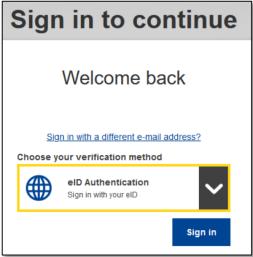
1. On the EU Login Welcome page, select eID Authentication and then click Sign In.
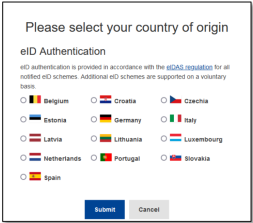
2. This will take you to the country selection page. Select the country of origin for your eID. Click Submit and you will be redirected to the country’s specific page for logging in with your eID. Following a successful login, you will be redirected back to EU Login and then to your application.
If you cannot log in with your eID, please visit the following link to learn how to add your eID: https://trusted-digital-identity.europa.eu/creating-managing-and-using-your-eu-login-account/how-can-i-add-my-eid-my-eu-login-account_en.