- Valid for
Sign in with an EU Login account using a token
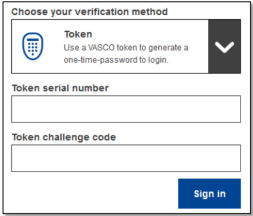
1.Select "Token" as the verification method. Enter your password in the "Password" field.
2. Take your token and look at the barcode at the back of it. Type all digits written on top of it in the "Token serial number" field without the hyphens. Please note that you can alternatively use the legacy format starting with a "T", but then only use the number between the hyphens.
3. Switch your token on and enter its 5-digit PIN code. The token displays a sequence of eight digits.
4. Type it in the "Token challenge code" field and click on "Sign in" to proceed to the service you requested to use.
Sign in with an EU Login account using a token CRAM
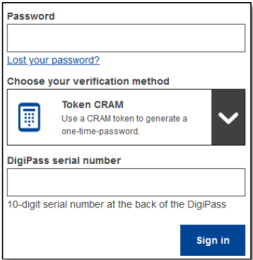
1.Select "Token CRAM" as the verification method. Enter your password in the "Password" field.
2. Take your token and look at the barcode at the back of it. Type all digits written below it in the "DigiPass serial number" field without the hyphens.
3. Click on "Sign in".
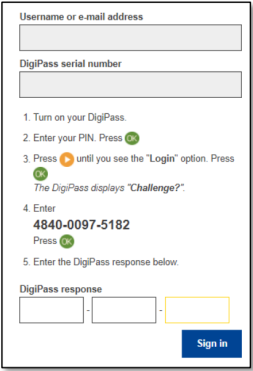
4. Carefully follow the instructions on screen and enter the DigiPass response in the "DigiPass response" fields
5. Click on "Sign in" to proceed to the service you requested to use.